
🎬 3D Designing & Modelling Workshop
Learn 3D designing, modelling, materials, lighting, and rendering using Blender through a fun, hands-on workshop.
🎓 All first-year students welcome — no prior experience needed!

🚀What You'll Learn
3D Basics & Blender Interface
Modelling Essentials
Lighting & Materials
Rendering Basics
Hands-on Mini Project
💻Before You Attend
Make sure you have these ready before coming to LP-108.
⬇️Blender Installation Guide
Find your CPU + GPU below and download the correct Blender version before the workshop.
| Hardware Configuration | Recommended Version | Download |
|---|---|---|
| i3 / Ryzen 3 — No dedicated GPU | Blender 2.8 | Download |
| i3 / Ryzen 3 — Integrated GPU | Blender 3.0 | Download |
| i3 / Ryzen 3 — Dedicated GPU | Blender 3.1 | Download |
| i5 / Ryzen 5 — No dedicated GPU | Blender 3.1 | Download |
| i5 / Ryzen 5 — Integrated GPU | Blender 3.3 | Download |
| i5 / Ryzen 5 — RTX 3050 | Blender 3.6 | Download |
| i7 / Ryzen 7 — No dedicated GPU | Blender 3.3 | Download |
| i7 / Ryzen 7 — Integrated GPU | Blender 3.3 | Download |
| i5 / Ryzen 5 — GPU > RTX 3060 | Blender 4.0 | Download |
| i7 / Ryzen 7 — GPU > RTX 3060 | Blender 4.0 | Download |
| i9 / Ryzen 9 — GPU > RTX 3060 | Blender 4.0 | Download |
⚠️ Important Notes
Intel 6th / 7th / 8th Gen (below 9th Gen) — use Blender 3.0 or lower.
Intel 9th–14th Gen or Ryzen 3000 and above — refer to the table above.
Integrated GPUs can run Blender but rendering will be slower.
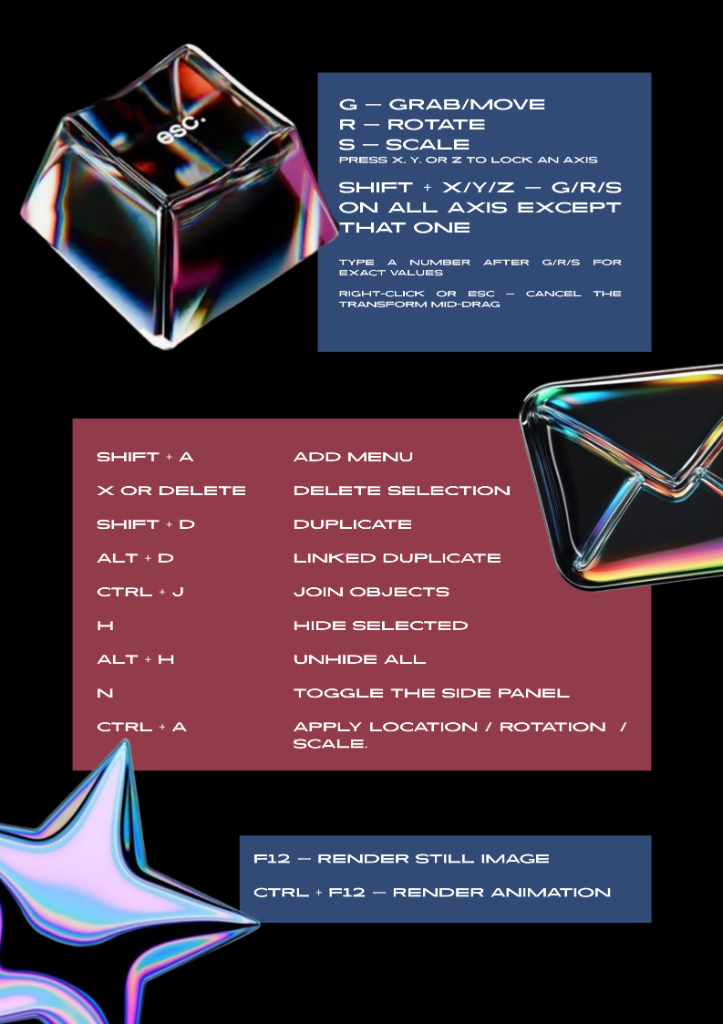
⌨️Blender Cheat Sheet
Keep this page open during the workshop for quick reference.
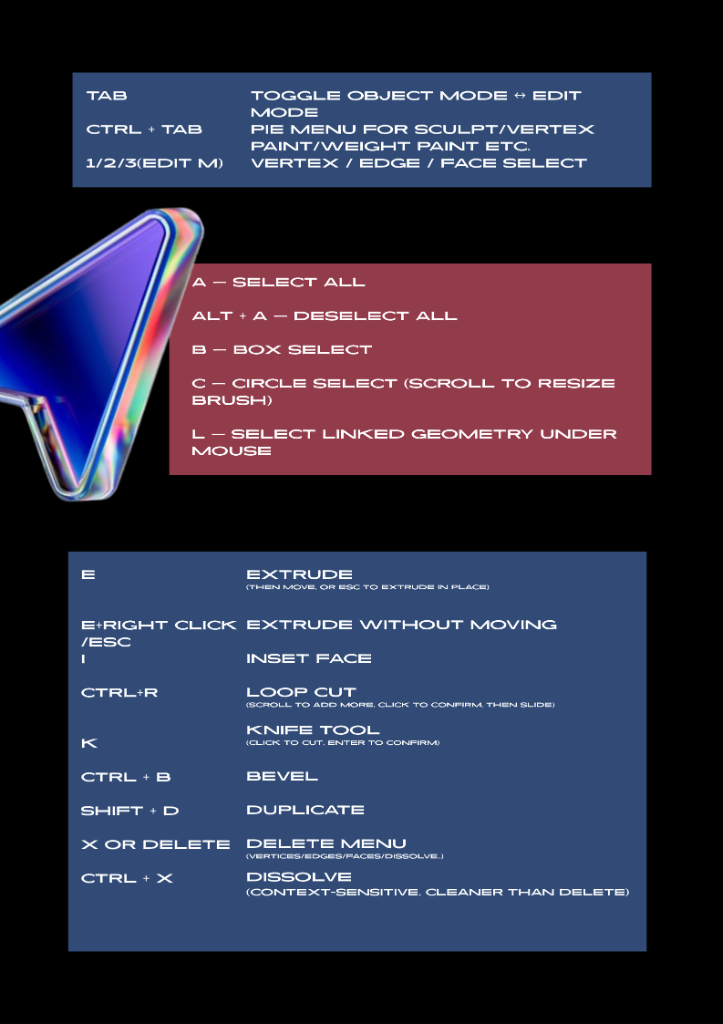
Navigation & Viewport
Selection
Modelling & Editing
Transform
Object Operations
Render
📦Workshop Resources
Bookmark this page — all resources will be uploaded here after the workshop.
About Glyptika Studios
Glyptika Studios is a student-led technology studio building products in AI, 3D, VR, and immersive technologies — fostering a community of students passionate about innovation and emerging tech.
❓ Need Help?
Having trouble installing Blender or have questions before the workshop? Reach out to us on Instagram — we are happy to help!